Troubleshooting
A catalogue of the messages this product actually prints, what each one means,
and what to do about it. Every quoted block below is the text as the gateway
emits it, with … marking the parts filled in at run time — so the message on
your screen is searchable against this page.
The messages fall into four groups by when you see them: the daemon refusing
to start, a session being refused, a isg system check row, or an operational
symptom with no message of its own. This page is the platform and SSH; the
pages a browser gets from Web Access are on
troubleshooting Web Access.
The gateway will not start
isg serve refuses rather than starting in a state that looks correct and is
not. Every refusal below names what is wrong; none of them has an override
switch, because a control that can be silently disabled is not a control.
An unrecognised key in a configuration file
unknown configuration key(s) — refusing to start:
  …
remove or correct the key(s) above; `isg system check` reports them too
Cause. A typo, or a key from a different file. The check runs across every registered configuration file before anything else is opened.
Fix. Correct or delete the key named. isg system check reports the same
finding without starting the daemon, so it is the faster loop. The
configuration reference is the authoritative list of
what each file accepts.
A non-loopback bind without authentication
non-loopback bind (0.0.0.0:8765) requires LDAP authentication — ldap.yaml must be configured; refusing to serve without auth
Cause. --bind names an address other than loopback and there is no
ldap.yaml, so the admin view would be reachable from the network with no
login at all.
Fix. Configure ldap.yaml, or bind loopback until you have. This is the
first systemctl start most installations hit, because the packaged unit binds
0.0.0.0 — configure the directory before enabling the unit.
An unencrypted connection to the directory
load identity resolver for web auth: configure LDAP resolver from /var/lib/isg/ldap.yaml: ldap: refusing to use the unencrypted url "ldap://dir.example.com:389": with scheme ldap:// and no start_tls, every operator's bind password and the service account's own password cross the network in the clear. Fix it with ONE of: url: "ldaps://dir.example.com:636"; or keep this url and add start_tls: true (same port, TLS before the first bind); or, if you accept plaintext passwords on this network, say so explicitly with allow_plaintext: true
Cause. ldap.yaml names an ldap:// url and sets neither start_tls: true
nor allow_plaintext: true. The admin view verifies an operator's password by
binding as that operator, so the connection carries operator passwords as well
as the service account's own — and the refusal is deliberate: before this
check existed, such a deployment ran with every one of those passwords readable
on the network and isg system check all green.
Fix. One of the three the message names. ldaps:// (port 636 by default) or
start_tls: true (the same port 389, upgraded before the first bind) are the
two real answers; allow_plaintext: true is the written-down decision to accept
plaintext on this network, and it turns the ldap.yaml row amber for as long as
it stands.
A contradictory TLS configuration for the directory
ldap: url "ldaps://dir.example.com:636" is already TLS, but start_tls: true is also set — these are two different ways to encrypt the same connection and cannot be combined …
Cause. Two keys in ldap.yaml that state different intentions. The same
refusal covers allow_plaintext: true next to ldaps:// or start_tls, and a
tls_ca_file on a connection that carries no TLS.
Fix. Delete the key that is not the intention. Nothing is silently resolved here on purpose: whichever key lost would be the one nobody notices.
The directory's certificate is not trusted, or does not match
[FAIL] LDAP bind failed to connect (dir.example.com:636): ldap dial ldaps://dir.example.com:636: LDAP Result Code 200 "Network Error": tls: failed to verify certificate: x509: certificate signed by unknown authority
Cause. The handshake completed on the wire and failed verification. Three
usual shapes, and the Go message distinguishes them in words: signed by an
unknown authority (the issuing CA is neither in tls_ca_file nor in the host's
trust store), expired or not yet valid (dated — isg system check's
LDAP bind row prints the expiry, and warns from 30 days out), or valid for a
different name (note that a url holding an IP address needs an IP SAN; a
DNS-only certificate fails here).
Fix. Point tls_ca_file at the PEM that issued the directory's
certificate, renew the certificate, or reissue it with the name the url
actually uses. A failed verification is a connection error, never a wrong
password: it does not touch the lockout counters in mfa.yaml, and no attempt
falls back to an unencrypted connection.
A non-loopback bind without TLS
non-loopback bind (0.0.0.0:8765) requires TLS — run `isg ca init` first; refusing to serve plain HTTP on the network
Cause. The web UI's server certificate is derived from the X.509 CA, and the CA has not been initialised. Authentication and TLS are both required for a network bind; either one missing is a refusal.
Fix. isg ca init --permitted-dns <name> --permitted-ip <CIDR>. It is
idempotent, and the SSH and X.509 halves are independent. The two flags are
required for a NEW X.509 CA and become its nameConstraints: the names this CA
may certify. With neither of them the command creates nothing and names both
flags plus the deliberate way out, --no-name-constraints.
Another daemon owns the state root
refusing to take the state root lease /var/lib/isg/serve.lease: …

holder: host …, broker id …, pid …, isg …; acquired …, heartbeat …

two brokers writing one file-based state root silently lose each other's writes …
Cause. Exactly one isg serve may own a state root. Two would not corrupt
each other's records — the second would silently discard the first one's
sessions.
Fix. Read the holder block. If the holder is running on this machine,
stop that process; the message says so explicitly and isg system lease release will refuse for the same reason. If the holder was on another machine
or a previous boot and you have confirmed it is gone, clear it with isg system lease release — not rm, which defeats the guard instead of satisfying it and
writes no audit entry. isg system lease status shows the holder without
changing anything.
A record store that has not taken the migration
…/storage.yaml: records.backend is "postgres", but the aggregate document … is still here — that state root has never taken the per-record migration, and doing both in one start would mean guessing twice; run once with records.backend: "dir" first, or move it aside
Cause. Two migrations in one start — legacy aggregate to per-record files, and per-record files to PostgreSQL — would mean guessing twice about what is current.
Fix. Do them one at a time: start once with records.backend: dir, let
that migration complete, then switch to postgres. Or move the aggregate
document aside if you know it is stale.
Two record stores that both hold records
both the aggregate … and the per-record directory … exist; refusing to guess which is current — move one aside
Cause. Both layouts are present and non-empty. Picking one would silently discard the other.
Fix. Decide which is current and move the other aside. Nothing is deleted by the gateway.
A credentials file that is readable by more than its owner
…: records.postgres.dsn_file … is mode 0644 — it holds a database password that can read and rewrite every session record, so it must not be readable by group or other (chmod 0600)
…: recordings.s3.credentials_file … is mode 0644 — it holds an access key pair that can read every archived session recording, so it must not be readable by group or other (chmod 0600)
vault token_file … has mode 0644 — must not be group- or world-readable (chmod 0600)
Cause. These three secrets live in their own files, separate from the configuration that names them, precisely so they can carry a tighter mode. The mode is checked, not assumed, and a loose one refuses the start rather than warning: a warning about a group-readable credential is a line a running gateway scrolls past.
Fix. chmod 0600 the file named, and check its owner while you are there.
A configured back-end that does not answer
…: the record store postgres:… did not answer within …: …
…: the stream store's bucket "…" at … did not answer, so `isg serve` will not start with a stream store it cannot reach: …
Cause. Wrong host, wrong credentials, a database that is not listening, a
firewall. Both back-ends are proved at startup on purpose — the alternative is
discovering it on the first isg connect hours later, when the symptom is a
session that will not start and nobody still connects it to a configuration
change.
Fix. The wrapped error is the driver's own. Note that no error from the record store carries the password: it is redacted before the message is built, so a DSN problem shows as a connection failure, not a credential dump.
A configuration value outside its legal set
unknown mfa_mode "…" in …: want one of "email", "totp", "totp-with-email-fallback"
parse connect config …: unknown host_key_check "…" (must be "strict" or "insecure")
parse connect config …: human_auth: local_keys is no longer supported — the client-side connect path was removed; set human_auth: cert
parse connect config …: allow_password_auth: true is no longer supported — the client-side connect path that implemented the password fallback was removed (ADR 653328395, S3); remove the key or set it to false
Cause. There is no safe way to coerce an unknown value into a known one, and no permissive default to fall back to. The last two name a mechanism that was removed rather than quietly reinterpreting the file — a deployment still carrying those lines needs to notice.
Fix. Use one of the values the message lists. For human_auth, cert is
the only legal value.
A CMDB mock file that was named but is not there
B398: cmdb.yaml names mock_file …, but that file does not exist — refusing to start. A static resolver with no mock file resolves EVERY host to an empty label set, so none of the … label_rules can ever match and every unpinned host falls back to default_level …, while the CLI still reports "CMDB: active" and "source: cmdb". …
Cause. cmdb.yaml sets resolver: static and names a mock_file, and the
file is not at that path. Before this refusal existed the gateway came up
anyway, with a resolver that answered every host with no labels at all — so no
label_rules entry could match, every unpinned host silently took
default_level, and isg servers show still reported CMDB: active. The
lockdown levels the deployment was configured to enforce simply were not in
effect, and nothing said so. Measured on a live broker on 2026-10-07, where it
had survived a full environment build.
Fix. One of three, and which one depends on what you meant. Put the file
where mock_file says it is — note that the mock is JSON, so a deployment
pipeline that ships *.yaml configuration files will not carry it unless it is
listed separately. Or point mock_file at the file that is already there. Or
remove the mock_file key: that is the explicit way to ask for an empty static
CMDB, and it is supported — the cmdb.yaml check row then reads amber and
names the consequence rather than refusing the start.
A relative mock_file resolves against cmdb.yaml's own directory, not
the daemon's working directory, so mock_file: cmdb_mock.json means the file
next to cmdb.yaml in the state root. A value starting with ~ is refused
outright: nothing in the daemon expands ~ — it runs as a system account under
systemd, never through a shell — so such a path would be opened literally.
A self-contradictory access policy
human_access.requested_by_enforce is true but human_access.enforce is false — enable human_access.enforce first; otherwise a request no allow rule covers falls through to a no_matching_rule denial enforced by requested_by_enforce alone, silently reintroducing the access gate's own enforcement
Cause. Turning on the narrower switch without the broader one would enforce the access gate through a back door the operator explicitly left open.
Fix. Set human_access.enforce: true first, or turn
requested_by_enforce back off.
A retention sweep interval below the floor
…: sweep.interval "…" (…) is below the … floor — one pass walks the state root and stats every closed session's artifacts, so its cost grows with the gateway's HISTORY rather than with how much there is to delete …
Cause. One sweep pass costs proportionally to how much history the gateway
has, not to how much there is to delete. This is refused even with
sweep.enabled: false, so a value that would break the gateway cannot sit on
disk waiting to be switched on.
Fix. Raise the interval. Omit the key entirely for the default.
The audit log cannot be opened
open audit log …: …
Cause. A permission problem, a missing parent directory, or a full disk. The audit log is the record of what happened, so a gateway that cannot write it does not run.
Fix. The wrapped error names the reason. Check the ownership of the state root against the account the unit runs as.
A session or a command is refused
A command matched a policy rule
DENIED by policy: block_interactive_root_shell (interactive root shell is not allowed)
Cause. The strictest rule that matched decided. The rule's name and its
reason are both in the message and both in the COMMAND_DENIED audit entry.
Fix. If the rule is one of the built-in denials, the command has to change
— no policy.yaml can weaken them. If it is your own rule, isg policy show
prints the whole effective rule set, each rule labelled by origin.
A rule matched part of the line, not the whole of it
DENIED by policy: block_passwd_changes (password changes must go through the IdP) — part 2 of 2: "passwd -S peter"
Cause. A line can run more than one command, and every one of them is
evaluated. The part 2 of 2 tail names which one matched — here the second
command on the line, not the id that preceded it. A tail that also says
(behind wrappers) means the rule matched after a leading sudo or a command
prefix such as env or timeout was stepped over.
Fix. Change that part, or put the commands on separate lines so each one gets its own decision. The audit entry still records the whole line as typed.
The line uses something the policy cannot evaluate
DENIED by policy: block_dynamic_shell_construct (command substitution ($(...)) cannot be evaluated by the policy before it runs — split it into separate lines)
Cause. The line contains a construct whose effect is only decided while it
runs: a command substitution, a process substitution, a here-document, a
function definition, eval, source, exec, alias, an interpreter given
its program as a string (bash -c), or a command name that only exists after
expansion. The default is to refuse these rather than guess at them.
Fix. Split the line into separate lines, each naming the program it runs.
Where that is genuinely not possible, policy.yaml's
dynamic_construct_action can be set to require_approval so a second person
decides instead; allow runs such lines unevaluated and is a lab setting, not
a posture to deploy. block_unparseable_line is the neighbouring case — the
line is not a shell line at all — and that one is not configurable.
exit was refused in the middle of a line
DENIED by policy: block_exit_in_compound_line (exit/quit/logout ends the session only as a line of its own — run it on its own line) — part 2 of 2: "exit"
Cause. exit, quit and logout close the session only when they are the
whole line. Inside id; exit the word is a command sent to the target, and it
would do nothing to your session — so the line is refused instead of quietly
doing the other thing.
Fix. Run the other commands, then exit on a line of its own.
Working out what a line will do before running it
isg policy check -- 'id; passwd -S peter'
Prints how the line decomposes, every candidate text the engine matches rules
against, and the rule that decided. It runs nothing, contacts no daemon and
writes nothing. Exit status is the answer: 0 allowed, 1 denied, 2
approval required. Use --file to evaluate against a policy file other than
the gateway's own, and --level / --role to evaluate as a different host
level or user role.
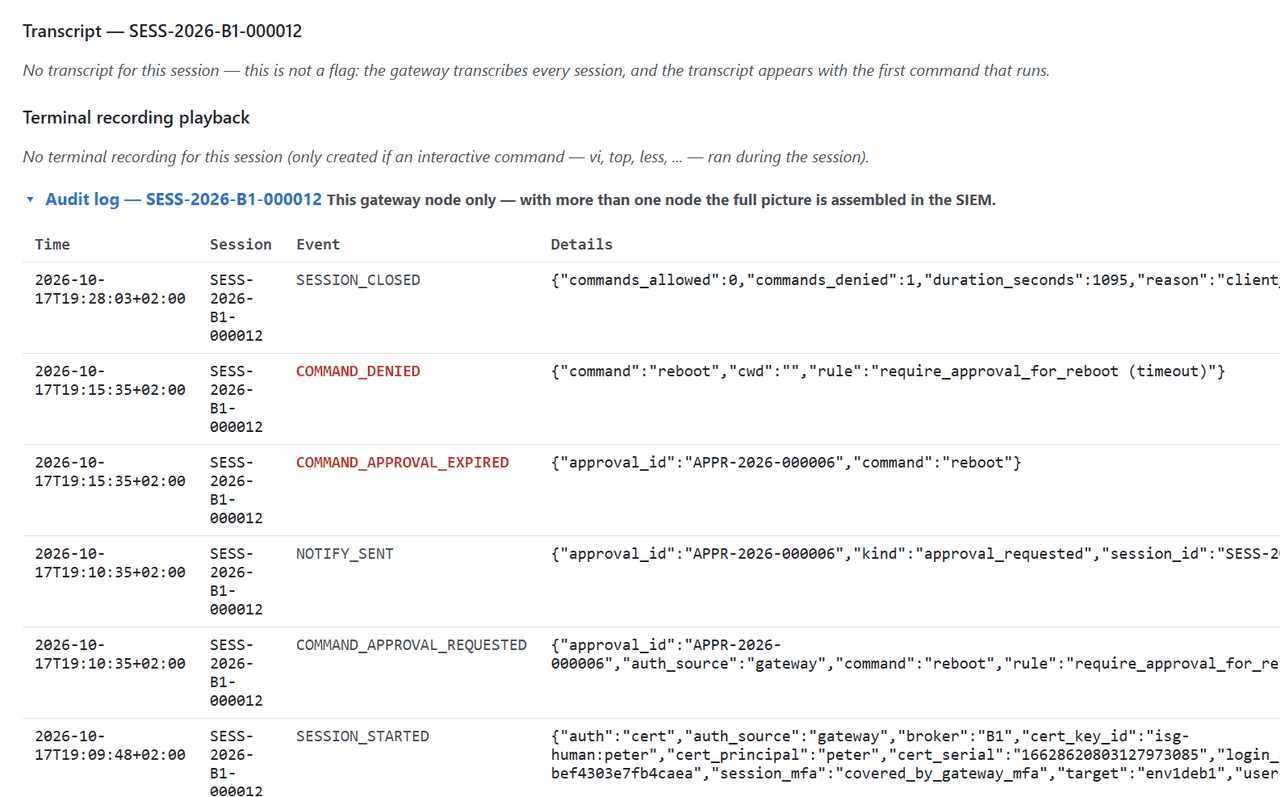
An approval request ran out of time
approval request APPR-2026-000042 expired without a decision
Cause. No approver decided within the rule's timeout_seconds (300 by
default).
Fix. Re-issue the command. Check that approvers are actually being reached
— notify.yaml configures the push, and a gateway with neither a webhook nor
an outbox notifies nobody.
Screenshot: reference environment (env1), 2026-10-17.
An approver said no
DENIED by …
Cause. A second person declined the request. This is a decision, not a fault.
Nobody could approve it
self-approval is not allowed: … requested this command and cannot decide it
Cause. The four-eyes rule. It holds unconditionally: the requester is never an eligible decider, regardless of role or group.
Fix. Somebody else in approver_group decides. If nobody else is in it,
that is the finding.
The access gate refused the connection
access denied: you are not authorized to open a session on <host> as <user> (no_matching_rule) — if you should have this access, contact your ISG administrator
The reason in the parentheses is from a closed set, and each one means something different:
| Reason | Meaning |
|---|---|
not_configured |
ca.yaml has no human_access section at all |
no_matching_rule |
No allow rule covers this principal on this host |
group_unverifiable |
A rule requires a group, but the groups came from users.json, not a directory — so the requirement cannot be checked |
labels_stale |
A host_labels rule could have matched, but the CMDB labels are from a stale cache |
labels_unavailable |
Same, with no usable labels at all |
Fix. For no_matching_rule, add the host to a rule's hosts: list or give
it a label an existing rule selects — there is no host wildcard. For
group_unverifiable, configure ldap.yaml: the fallback file cannot make a
group claim verifiable.
The requester was not allowed to act as that principal
access denied: you are not authorized to open a session on <host> as <user> (requester_mismatch) — if you should have this access, contact your ISG administrator
Cause. requester_mismatch means the matching rule has no requested_by
list, and the default is self-only: you may connect as yourself, not as someone
else. requester_not_listed means the rule has a list and you are not on it.
requester_unknown means the caller's own identity could not be established at
all, which is refused rather than guessed.
Fix. Name the caller in the rule's requested_by list. There is no
wildcard there — impersonation is spelled out or it does not happen.
A per-host group requirement was not met
access denied: you are not authorized to open a session on <host> as <user> (missing_required_group) — if you should have this access, contact your ISG administrator
Cause. hostgroup.yaml requires directory group membership for hosts with
these labels, and this user is not in the required group(s). The user's line
names only the reason; the required groups are in the hostgroup.yaml rule for
that label.
Fix. Add the membership in the directory, or change the requirement. With
hostgroup.yaml's enforce off, the same situation is audited as a
would-deny and does not block.
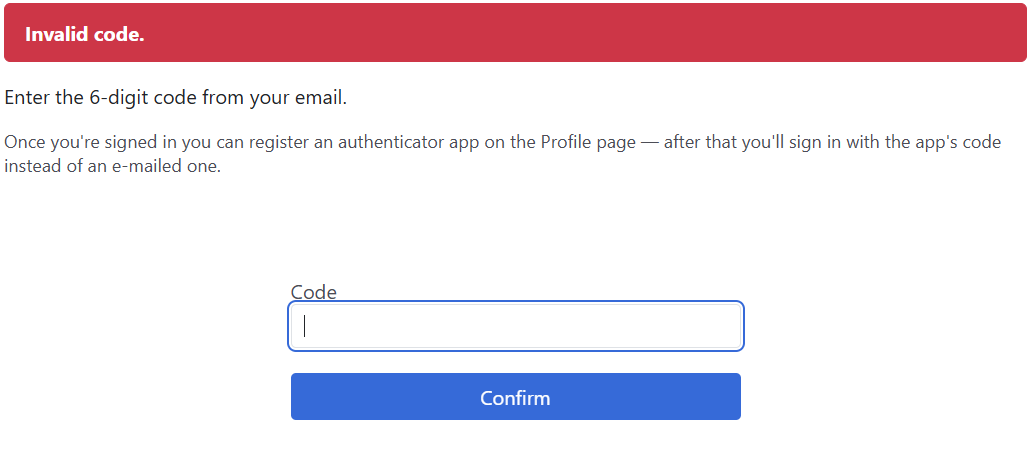
Multi-factor authentication did not complete
no MFA enrolled for "…"
MFA attempts exhausted
MFA challenge timed out waiting for a response
no email address for "…"
MFA is not configured on this daemon
Cause, in order. The user has never run isg mfa enroll and
mfa.yaml sets a TOTP mode. Too many wrong codes — repeated failures also lock
the user and the source address out for the periods mfa.yaml sets. No answer
in time. No mail attribute on the directory entry, in e-mail mode. No
multi-factor configuration at all.
Fix. For enrolment: isg mfa enroll, self-service, with isg serve
running. For a locked-out user, the lockout expires on its own; isg mfa reset
clears an enrolment and is itself gated by mfa_reset_group.
Screenshot: reference environment (env1), 2026-10-17.
The identity could not be resolved
could not resolve identity for …: …
Cause. A directory lookup that failed for an infrastructure reason — not "no such user", which is survivable. The daemon denies the session rather than continuing with empty group memberships and hoping a rule lets it through.
Fix. isg system check reports the directory's own row; the LDAP bind
check does a bind and a search and reports which of the two failed.
The target rejected the certificate
ssh: certificate authentication rejected by target
Cause. In certificate mode the gateway offers exactly one credential, so a
public-key failure unambiguously means that credential was refused. The usual
reason is that the target does not have TrustedUserCAKeys pointing at this
CA. There is no password fallback, deliberately: a prompt here would swallow
exactly the finding that matters.
Fix. Prepare the target host, then confirm with
isg system check --probe-hosts.
The target's own identity was rejected
ssh: target host key/certificate rejected
Cause. The target presented a host key the strict check would not accept: signed by a different CA, revoked, expired, the wrong principal for the name being dialled, or a plain host key rather than a certificate.
Fix. isg system check names which. The most common is a certificate
issued for a different name than the inventory dials — the principals must
match the dial name exactly.
isg system check rows
no human_access rule names this host
No allow rule mentions this target, so nobody can connect to it regardless of
who asks. Add it to a rule's hosts: list or to a host_labels selector.
host cert expired / host cert revoked / no host cert issued for this host
The gateway's own issuance ledger for this host. An expired certificate makes
the host unreachable in strict mode; the row warns for 30 days beforehand.
Re-issue with isg ca host-cert issue.
target offers a plain host key, not a certificate — sshd may have started without the host cert (fail-open); strict-mode connect would be rejected
sshd came up without the host certificate. The port answers and the host
looks healthy, and a strict connect would be refused. Check that
HostCertificate is set and that the file it names exists, then restart
sshd.
certificate rejected (cert_rejected)
The target refused a certificate this CA signed — TrustedUserCAKeys is
missing, points elsewhere, or was removed. Only visible under --probe-hosts,
because nothing on the gateway can read the target's sshd configuration.
duplicate host key shared with …
Two hosts hold the same SSH host key, normally from a golden image or a cloned
snapshot, so either can present the other's identity. Regenerate the clone's
host keys (ssh-keygen -A) and re-issue its certificate. Issuance refuses a
second certificate over an already-certified key for this reason.
breakglass_group_required is true but no breakglass_group is set — every break-glass attempt fails as a config error
The fail-closed switch is on with nothing to check against. Set
breakglass_group in ldap.yaml, or turn the switch off. Note that
break-glass is denied to everyone when no group is configured, switch or no
switch.
required but no group/directory (misconfig)
The same shape for one of the other gates: approver_group_required,
mfa_reset_group_required or ca_admin_group_required is on, and either the
group name or the identity source is missing.
ldap.yaml exists, but failed to build a resolver from it
The file is present and a directory connection was attempted and produced
nothing. A ldap.yaml with no url is a legitimate shape — it then carries
only the authorization gates' group names — and reads as "not configured"
instead.
resolver: static without mock_file — every host is unlabelled; label_rules never match
cmdb.yaml selects the static CMDB resolver and names no mock_file, so the
resolver has no data: every host resolves to an empty label set, no
label_rules entry can match, and every unpinned host takes default_level.
This is amber rather than red because it is a supported, deliberate shape — a
deployment wiring up its rules before the CMDB export exists. It is the
counterpart of the refusal above: naming a mock_file that is not there stops
the daemon, leaving the key out does not.
A green row names the resolved path and what the file carried, so the number is checkable against what you expect:
[OK ] cmdb.yaml resolver: static, 4 label rules, mock_file: /var/lib/isg/cmdb_mock.json, 10 hosts
The gateway login account or its group is missing
"isg-login" does not exist — run `isg system provision`
Cause. The account sshd's ForceCommand admits a human as, or the group
the gateway socket is bound to, has not been created.
Fix. isg system provision, as root. It is idempotent and creates exactly
those two things — it never writes /etc/pam.d/ or /etc/ssh/sshd_config.d/
and never restarts a service. The sibling messages
group "isg-gateway" does not exist on this host and
not a member of isg-gateway point at the same command.
… — this daemon cannot issue certificates until it can read the CA private key again; every human_auth: cert session will fail
The CA signing key is unreadable by the account the daemon runs as. Every
session needs a freshly signed certificate, so this is total. Check the
ownership of the CA directory against the unit's User=.
no scrape stamp at … / scrape stamp not refreshed for … — the daemon is probably not running
The diagnostic listener is enabled but the daemon's own stamp file is stale or absent. Read it as a statement about the daemon, not about your monitoring: the stamp is refreshed on a timer regardless of whether anything scrapes.
Measured locally as user …
The report's first line says the daemon was not asked, and why: the socket
was not reachable (the daemon is down), permission was denied on it (this
account is not in the isg-operators group — the next line says to add it,
or run as isg), the daemon is too old for the request, or --local was
given. Read the rest of the report as what THIS account can measure: the
rows behind the record store's credential say not measurable from this account and read WARN rather than failing — or passing. When the first line reads
Measured by the daemon (pid N, user isg) over …, the report is the daemon's
own — the same one the /system page shows — and none of this applies.
--probe-hosts requires the daemon-mediated audit channel, which is unavailable
The probes open real connections to production hosts, which appear in each
target's own sshd log; without the daemon there would be no ISG audit entry
to explain them. Start isg serve, or pass --probe-without-audit and accept
that trade explicitly.
--probe-hosts refused: another gateway-wide probe run happened too recently — wait …s before running again
Each run spends 4 of every target's 9-connection PerSourcePenalties budget,
scored against the gateway's address rather than an operator's. Running again
too soon trips the target's lockout, and the lockout produces a false FAIL that
invites another retry. Wait out the interval; do not retry to confirm a
failure.
Operational symptoms
The admin view is unreachable
failed to connect (…): …
healthz unreachable (https://…/healthz): …
The check dials the address and then asks /healthz over TLS. Work through
three things in order: the daemon is running (systemctl status isg-ui.service
and journalctl -u isg-ui.service); it bound the address you are dialling
(--bind defaults to 127.0.0.1, so a remote browser needs it widened — and
widening it requires authentication and TLS, see above); and the host firewall
permits the port (8765 by default).
A daemon that starts and then exits immediately is almost always one of the startup refusals in the first section — the reason is in the journal.
Approvals are not reaching anybody
Notification is best-effort and never blocks a session, so a misconfigured
notify.yaml produces silence rather than an error. Check that it names a
webhook or an outbox; with neither, nothing is delivered and the request waits
its full timeout.
An archived recording cannot be found
isg storage verify
It checks that every recording a session record calls archived is in the stream
store, at the size it was archived at. --deep additionally reads each one
back and compares its SHA-256 against the hash recorded at archival time. Run
the plain form routinely; the deep form is a full download of every archived
recording on an object store.
Audit files have drifted from their expected ownership
The Audit artifact isolation row reports each file family it measured, and
names a drift as owned by a login account, mode 0644, or both. The audit
log and the session artifacts belong to the daemon's account and are not
group- or world-readable. This is a WARN rather than a FAIL: it is a fact about
files already written, and nothing about it stops the gateway.
The audit log itself is never rewritten, never swept and never moved — it is append-only by contract. Its shape, mode and rotation behaviour are set out in the audit log schema, which is what a log shipper parses against.
Break-glass evidence is missing from a host
The per-host Break-glass command-audit chain row reports what arrived from a
target's own forwarding. When it reads not measurable: …, the gateway process
could not read the collector file — a path or permission problem on the
gateway, not on the target.