Getting started
This page takes a fresh Linux host to a running gateway with a first identity: install it, start it, point it at a directory, and confirm the result. From there the two capabilities part: a first SSH session on a target host is first SSH session, a first web console behind the ISG login is configuring applications. Everything below is the shipped default unless it says otherwise; the command reference and the configuration reference are the complete surface.
Prerequisites
A Linux host for the gateway. ISG ships as a single binary. Go is needed to build it (1.26 or newer) and not to run it, so the gateway host needs no language runtime, no application server and no database.
An OS account for the daemon, and a group for operators. The packaged
service runs as the user isg with the primary group isg-operators, and that
split is what the permissions rest on: the CA's private keys are owned by isg
and readable by nobody else, while the gateway's local sockets belong to
isg-operators so an operator can reach them without being able to read a key.
Network reachability to the target hosts on TCP 22. The gateway is the only thing that connects to them.
Two more are optional at this point and needed before the gateway is much use in production: a directory (LDAP or Active Directory) to resolve operators and their group memberships, and an SMTP relay if multi-factor codes are to be delivered by e-mail rather than by an authenticator app.
Install
Put the binary where the service unit expects it:
install -m 0755 isg /usr/local/bin/isg
The repository ships a systemd unit at packaging/isg-ui.service. Install it as
root:
cp packaging/isg-ui.service /etc/systemd/system/isg-ui.service
systemctl daemon-reload
systemctl enable --now isg-ui.service
systemctl status isg-ui.service
What that unit declares, and why each line is there:
[Service]
User=isg
Group=isg-operators
Environment=ISG_HOME=/var/lib/isg
RuntimeDirectory=isg
RuntimeDirectoryMode=0750
ExecStart=/usr/local/bin/isg serve --bind 0.0.0.0 --port 8765 \
          --issue-sock-mode 0660 --session-sock-mode 0660
Restart=on-failure
RestartSec=10s
Group=isg-operators is the process's primary group on purpose: the runtime
directory and the sockets in it inherit it, and with Group=isg operators could
not reach them at all. RuntimeDirectoryMode=0750 lets them enter /run/isg to
open a socket by name without being able to list the directory.
Note that this unit binds 0.0.0.0, and the gateway refuses a non-loopback bind
until both authentication and TLS are in place. Enable the unit after the
first-start and first-identity steps below, or the first systemctl start will
fail with a message naming what is missing. That refusal is the point — it is
the one thing standing between a misconfiguration and an unauthenticated admin
view on the network.
Nothing on the gateway host is needed for the CLI path beyond this. isg system provision, which creates the OS group and account for the SSH-gateway login
path, is for a different entry point and is not required to run isg connect.
This page describes the manual, single-host route; a fleet — several brokers behind a shared address, a shared store, a directory — is installed with Ansible as described on the fleet deployment page.
First start
Run the daemon in the foreground once, on loopback, to see what it creates:
isg serve
It prints what it took ownership of and what it opened:
[ISG] State root lease: /var/lib/isg/serve.lease (held by pid 1234)
[ISG] Local session socket: /run/isg/session.sock (mode 0660)
[ISG] Local issuance socket: /run/isg/issue.sock (mode 0600)
[ISG] CA not initialized — renew endpoint not started (run `isg ca init` first)
[ISG] Admin UI: http://127.0.0.1:8765/
[ISG] Press Ctrl+C to stop.
The state root is where all of this lives. It is resolved in one order, and
only one: $ISG_HOME if set, then the home: key of /etc/isg/isg.conf if that
file exists, then ~/.isg. The packaged unit sets ISG_HOME=/var/lib/isg; a
system-wide /etc/isg/isg.conf is the way to make every account — including
sudo and cron — resolve to the same tree without exporting anything.
A first start creates the state root, takes an exclusive lease on it, opens
audit.log, and binds the local sockets. It does not create configuration
files: a state root with no configuration at all is a valid first-run state, and
each file's absence has a defined meaning. The line about the CA is not an error
— the daemon serves without one; it just cannot issue anything yet.
Only one daemon may own a state root at a time. If a start is refused because
the lease is held, isg system lease status says by whom and whether that
process is still alive.
Screenshot: reference environment (env1), 2026-10-17.
First identity
Without ldap.yaml the admin view runs with no login, and approval decisions
are not checked against a group. The four-eyes rule still holds — nobody can
approve their own request — but "who may approve at all" is not answered by
anything. Configure the directory before the gateway leaves loopback.
A minimal ldap.yaml in the state root:
url: "ldaps://directory.example.com:636"
tls_ca_file: "/etc/pki/ca-trust/source/anchors/example-root.pem"
bind_dn: "cn=isg,ou=service,dc=example,dc=com"
bind_password: "…"
base_dn: "ou=people,dc=example,dc=com"
group_base_dn: "ou=groups,dc=example,dc=com"
user_attr: "uid"
timeout_seconds: 5
approver_group: "approvers"
The url is ldaps:// because an unencrypted one refuses the start: the
operator passwords the admin view verifies, and the service account's own
bind_password, all cross this connection. A directory that serves TLS on the
plain port instead takes the same host with an ldap:// url on port 389 and
start_tls: true. tls_ca_file is only needed for a private CA — left out,
the host's system trust store decides — and if the url holds an IP address
rather than a name, the certificate needs an IP SAN for it. Should the
directory offer no TLS at all, allow_plaintext: true is the explicit, and
loudly reported, way to proceed anyway; the
access model states the whole rule.
approver_group names the group whose members may decide approval requests.
Setting approver_group_required: true alongside it turns a missing identity
source or a missing group name from a permissive fall-through into a hard
configuration error — worth doing once the group actually exists and is
maintained. The same pattern is available for the multi-factor reset gate and
the CA administration gate; every key is listed in the
configuration reference.
Restarting the daemon with ldap.yaml present switches the admin view to
form-based login. Where no directory is available, users.json in the state
root is the fallback identity source.
If the organisation has an OIDC identity provider, sso.yaml can hand the
login itself to it — the browser login of the admin view, and the SSH gateway
login by the device flow. That does not make the directory optional: the name
the provider returns is only looked up in it, and a name the directory does not
know is refused. The keys are in the
configuration reference.
Next: an SSH target or a web console
The gateway now knows who its users are. What they reach through it is one of two things, and each has its own short route:
- A target host over SSH — prepare one server and open a first session: first SSH session.
- A web console — put Grafana, Prometheus or a BMC's web interface behind the
same login: an
apps.yamlwith one application, a DNS name for it and a listener certificate, as on configuring applications; how Web Access works is the path a request takes.
Verify
The installation:
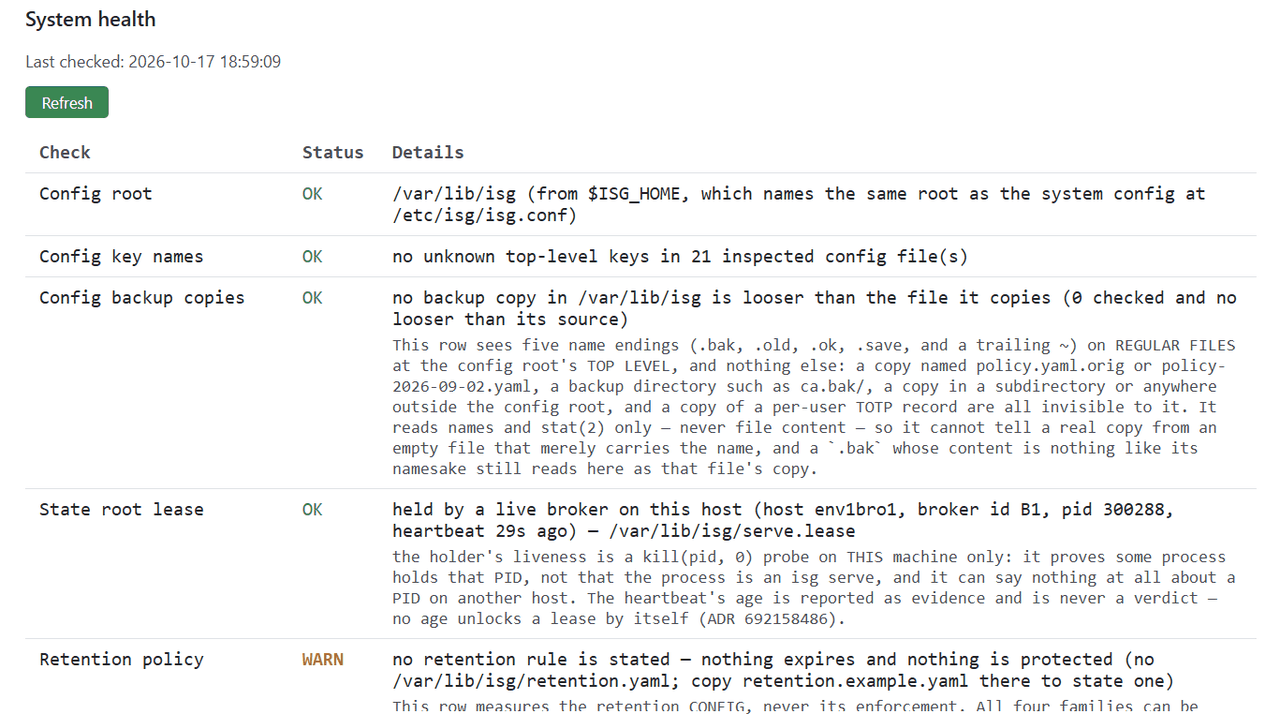
isg system check
It validates every known configuration file — existence, syntax, and the file's
own loader where one exists — and probes live connectivity to whatever this
gateway is configured to talk to. It exits non-zero if any row fails, so it wires
directly into cron or an external monitor. Add --verbose to see the sub-steps
behind each live check and each row's caveat: what that check did not measure.
Screenshot: reference environment (env1), 2026-10-17.
The running daemon, once diag.yaml has enabled: true:
curl http://127.0.0.1:8767/healthz
ok
/healthz is bare liveness — no dependency checks, no file reads, and never
authenticated, because a probe must not be gated behind a token or a dependency
that might itself be the thing that is down. /readyz alongside it reports
dependency health, and /metrics exposes the Prometheus registry; both honour
auth_token if diag.yaml sets one.
A session — SSH or Web Access — is in the admin view at
https://<gateway>:8765/, and in audit.log as a line per event. The audit log is append-only and is the
record of what happened; the audit event catalog
lists every event name the gateway writes, and the
audit log schema is the contract a log shipper parses
against.
This page is the single-host route. For a fleet — several brokers behind a shared name — the client side of
the first login (the @cert-authority line, the web UI's certificate, the browser-facing components) is the
last section of the fleet deployment page.